Getting Maya version - it might be confusing, the return value is unicode (sort of string). So for comparing version, it's ideal to convert to INT first.
Monday, 4 December 2023
Wednesday, 21 December 2022
Maya 2022 - missing deformer set
Interesting post about Maya 2022 (2023 and higher version) and Deformer Sets:
https://forums.autodesk.com/t5/maya-animation-and-rigging/maya-2022-and-deformer-sets/td-p/10599169
Basically they were replaced by Component Tags, which means copyDeformerWeights command cannot normally work to copy weights.
But apparently there is a workaround:
Deformer sets are still supported (and I'm guessing they'll never actually go away for compatibility reasons). You can switch back to them by disabling "Settings > Animation > Use component tags for deformation component subsets". You can turn it back on when it's convenient to migrate over, and existing scenes should work regardless of what that's set to.
Tuesday, 10 May 2022
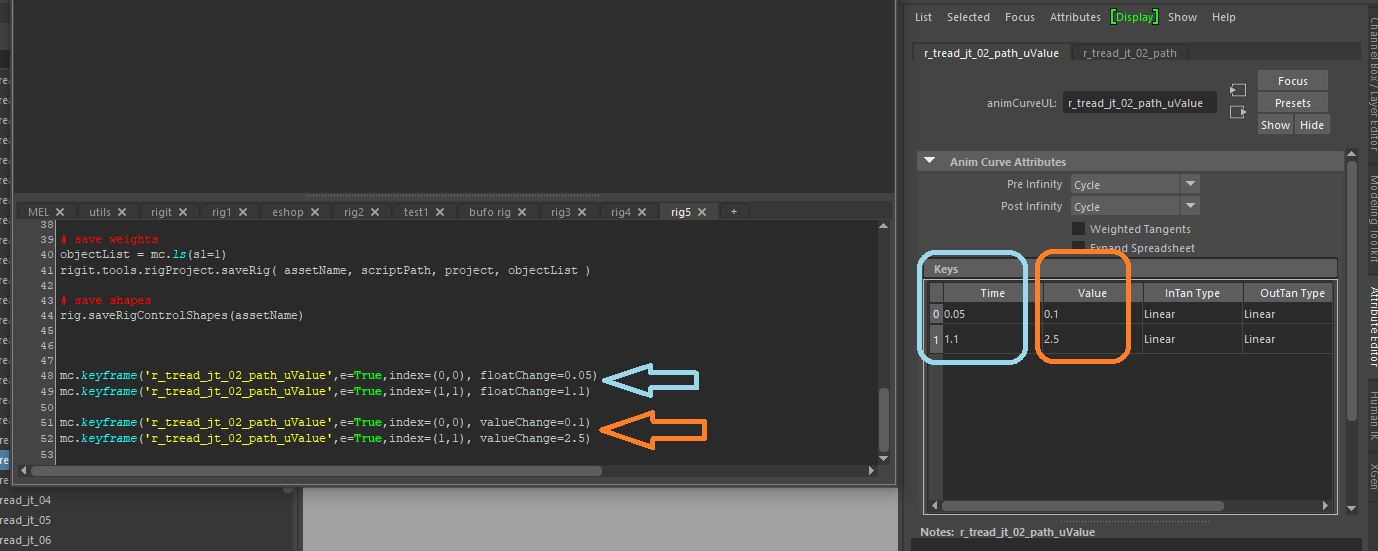
Little hint for Autodesk Maya to edit keyframe node values using keyframe command :
mc.keyframe('r_tread_jt_02_path_uValue',e=True,index=(0,0), floatChange=0.05)
mc.keyframe('r_tread_jt_02_path_uValue',e=True,index=(1,1), floatChange=1.1)
mc.keyframe('r_tread_jt_02_path_uValue',e=True,index=(0,0), valueChange=0.1)
mc.keyframe('r_tread_jt_02_path_uValue',e=True,index=(1,1), valueChange=2.5)
Friday, 7 August 2020
Maya Indie - global license is here
Monday, 25 November 2019
Highlight Affected - Maya 2019
This is called Highlight Affected and is Off by default in Maya 2019. Also you cannot turn it back On in Preferences anymore. This feature was also moved under new menu:
Display > Animation > Highlight Affected
Friday, 23 August 2019
Maya - get FramesPerSecond setting by script
Here is example how to get this in python:
import maya.cmds as mc
framesRateInSecondStr = mc.currentUnit( q = True, time = True )
framesRateInSecondOptions = { 'game':15, 'film':24, 'pal':25, 'ntsc':30, 'show':48, 'palf':50, 'ntscf':60 }
if 'fps' in framesRateInSecondStr:
fpsStr = framesRateInSecondStr.replace( 'fps', '' )
framesRateInSecond = float( fpsStr )
else:
framesRateInSecond = framesRateInSecondOptions[framesRateInSecondStr]
Saturday, 29 December 2018
global hotkey in Maya
https://bindpose.com/custom-global-hotkey-maya/
Tuesday, 25 September 2018
Latest tip for converting PySide ui Qt user interface code to python
http://help.autodesk.com/view/MAYAUL/2018/ENU/?guid=GUID-FAD0F6CC-15D0-4489-9372-028146B70F49
Here is also tips for using PySide in Maya 2017:
http://help.autodesk.com/cloudhelp/2017/ENU/Maya/files/GUID-0617A132-1B57-474F-A656-6E71A002CA28.htm
Friday, 29 June 2018
Face capture in mobile phone
http://www.bannaflak.com/face-cap/index.html
You can capture face performance with pretty good quality using iPhoneX and export is supported for applications like Maya, Blender, Cinema4D or Houdini.
Friday, 6 April 2018
Custom Character Toolkit for download
Maya - Custom Character Toolkit (2004)
https://drive.google.com/file/d/1t2x5C7NKr10we_r5AHwGh_f4HoRZFX7V/view?usp=sharing
Sunday, 26 November 2017
Deformation layering in GPU friendly way
https://medium.com/@charles_76959/deformation-layering-in-mayas-parallel-gpu-world-15c2e3d66d82
Monday, 6 November 2017
Maya joint rotation evaluation problem - solved
I have made 3-channel connection (XYZ) from joint to another joint. It was completely ignoring one axis when rotating on driven joint. But only when joints where hidden (visibility hidden). If the joints where visible or only hidden using Model display Show > Joints, then it would evaluate all 3 axis.
So I have connected the joint using per-axis connections:
rotationX -> rotationX
rotationY -> rotationY
rotationZ -> rotationZ
And then it started to work again. So in case you have this problem, this might be a workaround.
Tuesday, 11 July 2017
Advanced Rig Deformation Tutorial
Thursday, 29 June 2017
Qt Creator IDE - Qt Designer for Windows
https://info.qt.io/download-qt-for-application-development
or here:
http://download.cnet.com/Qt-Creator-IDE/3000-2212_4-75300653.html
Then if you are just starting to learn this tool and Design tab is greyed out, make sure that you select the *.ui file from the files dropdown in Edit mode, usualy its mainwindow.ui. Then the Design mode should become active and you can start easy visual creation of the GUI.
Saturday, 27 May 2017
Maya channelBox in-line math operations
I wanted to make a post about this common technique, that not every TD in Maya knows. Especially the new ones who maybe switched from XSI or 3ds max.
How can make relative proportional change of one attribute value for multiple selected objects in Channel Box.
Imagine you have bunch of locators on one side, all different position, and you want to make duplicated locators on opposite side across some axis, let`s say world X.
So you duplicate them first and with the duplicated locators selected, you can now click select the TranslateX channel number field ( make sure its the number field, not the name) and now type:
*=-1
This simple formula will multiply each selected locator TranslateX value. And the effect will be moving them to the opposite side.
You can read more here at this post by Asephei.
http://asephei.blogspot.cz/2011/03/maya-numeric-expressions-in-channel-box.html
Thursday, 18 May 2017
Maya python UI passing argument in command
More about this technique here:
http://download.autodesk.com/us/maya/2011help/pymel/ui.html
Note - this is all one function myUI(), where buttonPressed is function defined inside that function. It doesn`t have to be, but this way it is localised and only visible to the UI function.
import maya.cmds as mc
def myUI():
def buttonPressed(name):
print "pressed %s!" % name
win = mc.window(title="My Window")
layout = mc.columnLayout()
btn = mc.button( command = lambda *args: buttonPressed('chad') )
showWindow()
Sunday, 15 January 2017
Battleborn rigging interview
http://area.autodesk.com/customer-stories/gamedev-ep-26---ryan-metcalf?src=fbad
Saturday, 14 January 2017
Maya 2017 Pose Editor script tweak
In case your mesh shape was the same like its transform parent. For example transform: "body_geo" has shape: "body_geo". Maya will get clashing name problem when using duplicated shape which gets created for Pose Shape. Because duplicate command does not return long names.
If you want to prevent this to happen, just edit the duplicate command in file:
Maya2017/plug-ins/camd/scriptsposeInterpolatorAddShapePose.mel
add -rc flag to duplicate command on line 19 like this:
string $copyMesh[] = `duplicate -rc $longName`;
This is renameChildren flag which makes sure that new DAG nodes will have unique names. The whole edited file is also available for download on this link:
https://drive.google.com/open?id=0B7o5K0aCMVWPdURJMkdYOXpROFE
Free Animation Tools
http://www.studiolibrary.com/
http://camiloalan.wixsite.com/atoolswebsite