Pages

Wednesday, 21 December 2022

Maya 2022 - missing deformer set

 Interesting post about Maya 2022 (2023 and higher version) and Deformer Sets:


https://forums.autodesk.com/t5/maya-animation-and-rigging/maya-2022-and-deformer-sets/td-p/10599169


Basically they were replaced by Component Tags, which means copyDeformerWeights command cannot normally work to copy weights.

But apparently there is a workaround:

Deformer sets are still supported (and I'm guessing they'll never actually go away for compatibility reasons).  You can switch back to them by disabling "Settings > Animation > Use component tags for deformation component subsets".  You can turn it back on when it's convenient to migrate over, and existing scenes should work regardless of what that's set to.


Tuesday, 10 May 2022

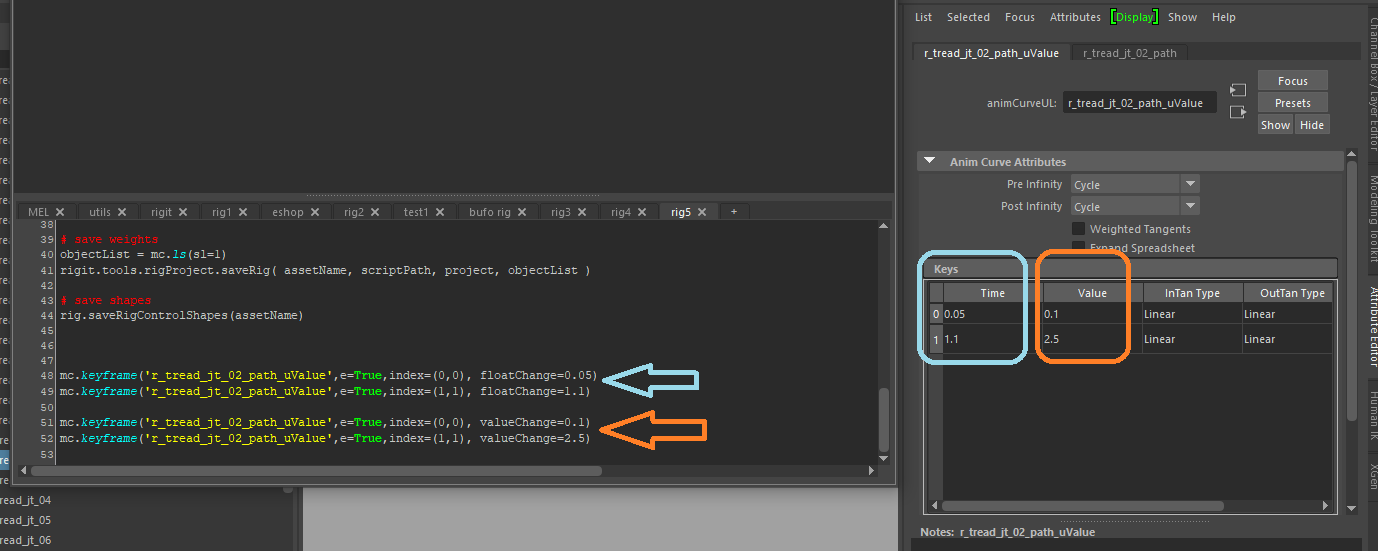
Little hint for Autodesk Maya to edit keyframe node values using keyframe command :


mc.keyframe('r_tread_jt_02_path_uValue',e=True,index=(0,0), floatChange=0.05)

mc.keyframe('r_tread_jt_02_path_uValue',e=True,index=(1,1), floatChange=1.1)


mc.keyframe('r_tread_jt_02_path_uValue',e=True,index=(0,0), valueChange=0.1)

mc.keyframe('r_tread_jt_02_path_uValue',e=True,index=(1,1), valueChange=2.5)

Friday, 7 August 2020

Wednesday, 15 July 2020

Maya - Writing Creature Deformers tutorial

One of the first tutorials for making Maya deformer plugins was no more available anywhere. Now found at this link by community.


Maya Techniques - Writing Creature Deformers
(2006)


Saturday, 11 January 2020

WASD arrows switch / remap keyboard problem

If you suddenly cannot type A, W, S, D on your keyboard, maybe these keys were actually remapped to arrow keys. This could happen during playing a game.

Most keyboard can fix this if you press [Fn] key and then [w] key holding both pressed. This should switch the mapping of the keys back to letters and arrows.

More in this video here:


ALSO read:

Windows key not working

This can also happen. And I managed to sort it by pressing [Fn] key and then [Windows] key.