Getting Maya version - it might be confusing, the return value is unicode (sort of string). So for comparing version, it's ideal to convert to INT first.
Monday, 4 December 2023
Tuesday, 10 May 2022
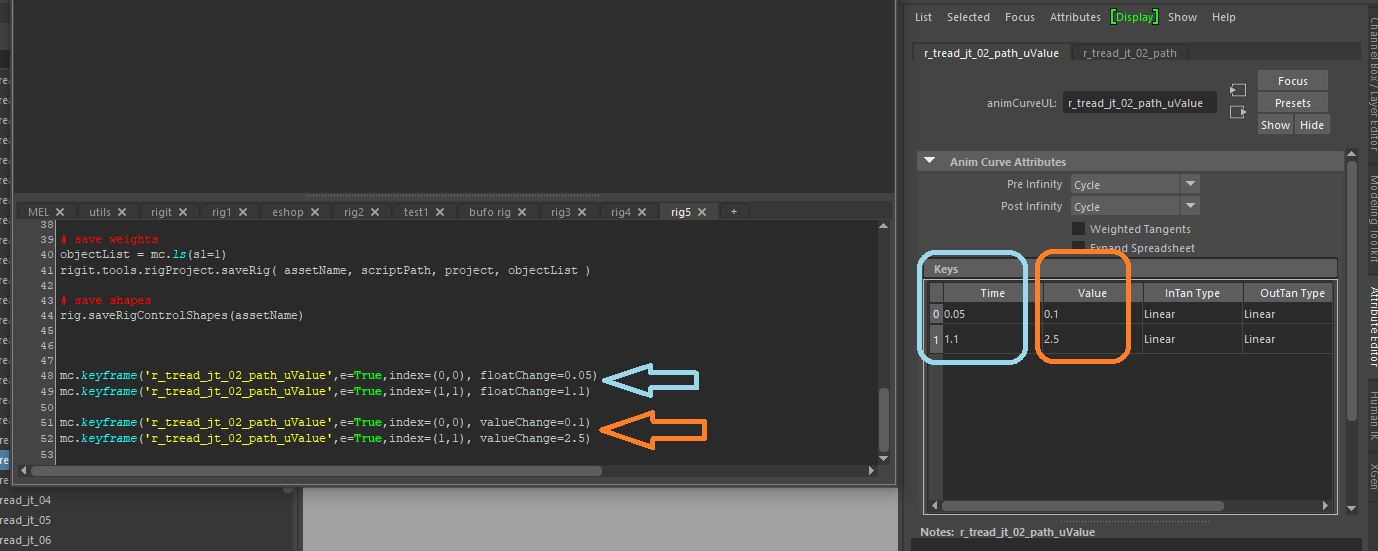
Little hint for Autodesk Maya to edit keyframe node values using keyframe command :
mc.keyframe('r_tread_jt_02_path_uValue',e=True,index=(0,0), floatChange=0.05)
mc.keyframe('r_tread_jt_02_path_uValue',e=True,index=(1,1), floatChange=1.1)
mc.keyframe('r_tread_jt_02_path_uValue',e=True,index=(0,0), valueChange=0.1)
mc.keyframe('r_tread_jt_02_path_uValue',e=True,index=(1,1), valueChange=2.5)
Friday, 23 August 2019
Maya - get FramesPerSecond setting by script
Here is example how to get this in python:
import maya.cmds as mc
framesRateInSecondStr = mc.currentUnit( q = True, time = True )
framesRateInSecondOptions = { 'game':15, 'film':24, 'pal':25, 'ntsc':30, 'show':48, 'palf':50, 'ntscf':60 }
if 'fps' in framesRateInSecondStr:
fpsStr = framesRateInSecondStr.replace( 'fps', '' )
framesRateInSecond = float( fpsStr )
else:
framesRateInSecond = framesRateInSecondOptions[framesRateInSecondStr]
Saturday, 29 December 2018
global hotkey in Maya
https://bindpose.com/custom-global-hotkey-maya/
Tuesday, 25 September 2018
Latest tip for converting PySide ui Qt user interface code to python
http://help.autodesk.com/view/MAYAUL/2018/ENU/?guid=GUID-FAD0F6CC-15D0-4489-9372-028146B70F49
Here is also tips for using PySide in Maya 2017:
http://help.autodesk.com/cloudhelp/2017/ENU/Maya/files/GUID-0617A132-1B57-474F-A656-6E71A002CA28.htm
Thursday, 18 May 2017
Maya python UI passing argument in command
More about this technique here:
http://download.autodesk.com/us/maya/2011help/pymel/ui.html
Note - this is all one function myUI(), where buttonPressed is function defined inside that function. It doesn`t have to be, but this way it is localised and only visible to the UI function.
import maya.cmds as mc
def myUI():
def buttonPressed(name):
print "pressed %s!" % name
win = mc.window(title="My Window")
layout = mc.columnLayout()
btn = mc.button( command = lambda *args: buttonPressed('chad') )
showWindow()
Tuesday, 24 January 2017
Remove code line breaks
http://www.textfixer.com/tools/remove-line-breaks.php
Sunday, 24 April 2016
Eclipse installation
https://wiki.eclipse.org/Eclipse/Installation
For those programming with Python choose C/C++ build and then once running Eclipse, go to Help / Install New Software to add PyDev extension. More about that here:
http://www.pydev.org/download.html
Friday, 22 April 2016
Kate text editor - remove new lines
In case you want to remove all new lines "\n" - merge lines into one, just select the lines you want to merge and press Ctrl + j.
This is operation which can save you a lot of time. For example if you copy paste printed python list from Maya and want to put this result to a list defintion in your python script in Kate.
Sunday, 10 April 2016
Maya.env tips
Below is example of Maya.env file with custom path to MEL scripts, python scripts and plugins.
Note that plugins contain both path to python scripted plugins as well as C++ compiled plugins. Also plugins unlike scripts are stored under Maya version specific folder. Should be done for scripts too, but usually it`s not needed.
TIP: you can also use USER_SCRIPT_PATH in your Maya MEL script sourcing function. If you recursively source every subfolder from here, you have all MEL scripts available after Maya starts. This is done from a userSetup.mel which is special Maya file you can define. And as long as it is found in MAYA_SCRIPT_PATH it will be executed first after Maya starts.
TIP: By defining USER_SCRIPT_PATH you get this relative root folder and if you move your library to different place or computer, you just change this one and your library can be found by Maya again.
More about userSetup.mel here:
https://knowledge.autodesk.com/support/maya/learn-explore/caas/CloudHelp/cloudhelp/2015/ENU/Maya/files/PC-Run-MEL-commands-whenever-Maya-starts-up-htm.html
Autodesk documentation about defining Maya.env variables:
https://knowledge.autodesk.com/support/maya/learn-explore/caas/CloudHelp/cloudhelp/2016/ENU/Maya/files/GUID-DB30AAB7-4639-4C3B-A479-7F26D953E0F2-htm.html
Example Maya.env file content on Windows OS:
USER_SCRIPT_PATH = C:\Users\syntetik\Documents\maya_tools
MAYA_SCRIPT_PATH = %USER_SCRIPT_PATH%\mel\mystuff;%USER_SCRIPT_PATH%\mel\thirdparty;%USER_SCRIPT_PATH%\mel\startup
PYTHONPATH = %USER_SCRIPT_PATH%\python\
USER_PLUGIN_PATH = %USER_SCRIPT_PATH%\plugin\maya2016
MAYA_PLUG_IN_PATH = %USER_PLUGIN_PATH%\mystuff;%USER_PLUGIN_PATH%\my_scripted;%USER_PLUGIN_PATH%\thirdparty_scripted;%USER_PLUGIN_PATH%\thirdparty
Thursday, 18 February 2016
Exploring Human Muscles Setup in Maya Course
Thursday, 16 July 2015
Maya UUID
import maya.cmds as mc
mc.ls(objUUID)[0]
Sunday, 28 June 2015
Cg & programming keyboard
So this is my latest keyboard. Connect IT LED illuminated. Keys are classic layout, not too hard to press but still with feedback.
Feels very comfortable for typing. I've also added soft pad to reduce the noise which comes from the table when typing. I can recommended this one. As a nice bonus there is control for volume and other multimedia functions with Fn key combination.
Monday, 16 September 2013
Maya command
import maya.cmds as mc
mc.viewFit()
Saturday, 13 July 2013
TD Channel on youtube
And here is another great looking youtube channel with videos about programming and scripting. And there is a lot of videos focused on programming for Maya. Definitely check this out if you are a Maya TD either working in pipeline or for a specific department.
http://www.youtube.com/user/TDChannel11?feature=watch
Autodesk learning channel for TDs
This is great channel which is run by Autodesk for learning their products, including Maya. I have found really good videos for making python plugins for Maya starting from a basic level. Even explaining ideal installation of my favourite python IDE, Eclipse.
http://www.youtube.com/playlist?list=PLC046B3E3DEA809D4
If you want to learn developing tools for Maya or need to be more efficient as a TD make sure to check out this channel, there might be some useful information for you.
Sunday, 23 June 2013
Saturday, 25 May 2013
straps rig setup
strap rig download link (Maya Binary 2012)
And here is step by step tutorial.
Wednesday, 3 April 2013
Josh Carrey from REEL FX to teach rigging at Anomalia
ANOMALIA 2013 Advanced Cartoon Rigging with Josh Carey [REEL FX] from ANOMALIA on Vimeo.
Saturday, 9 March 2013
Yeti used to generate feathers in Ftrack pipeline
http://rendermansite.pixar.com/view/Fido
Yetti website:
http://peregrinelabs.com/
Also, the pipeline used at Fido is built on Ftrack. Similar to Shotgun, this is online commercial VFX production and asset management system. They currently offer less features but have also currently lower pricing then Shotgun, which is interesting. See bottom of the same page.
According to ftrack on twitter, they are working on better integration and some publishing tools for common VFX applications like Maya and Nuke and even adding support for RV as review system and Dropbox for storing assets and shots online.
Ftrack website:
http://www.ftrack.com/