Getting Maya version - it might be confusing, the return value is unicode (sort of string). So for comparing version, it's ideal to convert to INT first.
Monday, 4 December 2023
Wednesday, 21 December 2022
Maya 2022 - missing deformer set
Interesting post about Maya 2022 (2023 and higher version) and Deformer Sets:
https://forums.autodesk.com/t5/maya-animation-and-rigging/maya-2022-and-deformer-sets/td-p/10599169
Basically they were replaced by Component Tags, which means copyDeformerWeights command cannot normally work to copy weights.
But apparently there is a workaround:
Deformer sets are still supported (and I'm guessing they'll never actually go away for compatibility reasons). You can switch back to them by disabling "Settings > Animation > Use component tags for deformation component subsets". You can turn it back on when it's convenient to migrate over, and existing scenes should work regardless of what that's set to.
Tuesday, 10 May 2022
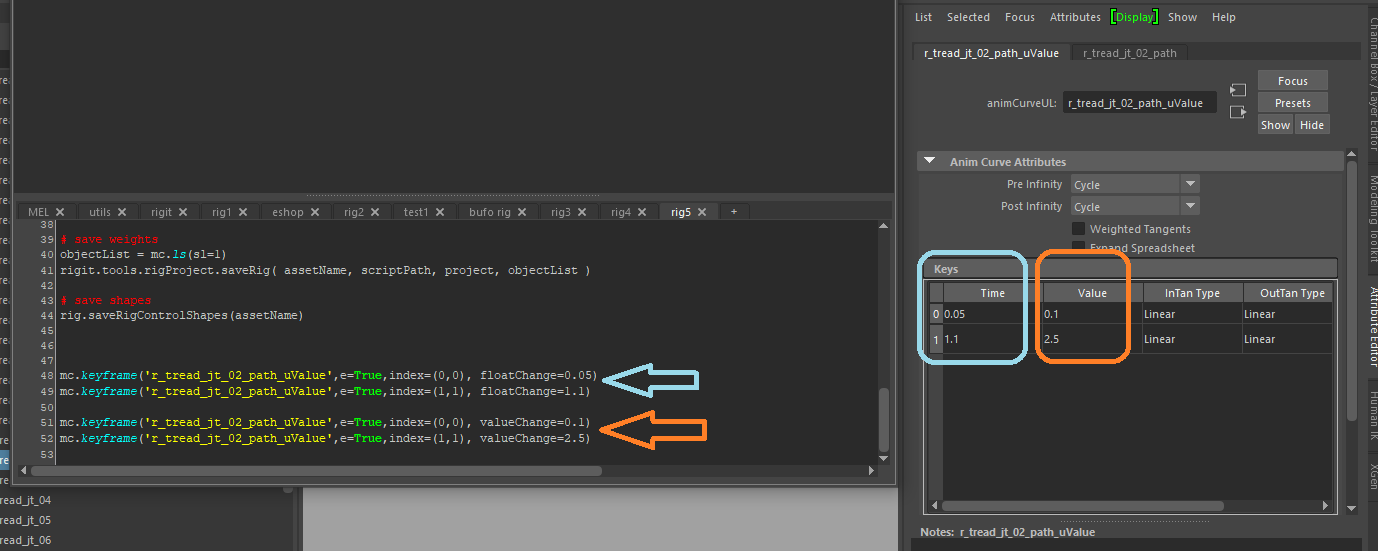
Little hint for Autodesk Maya to edit keyframe node values using keyframe command :
mc.keyframe('r_tread_jt_02_path_uValue',e=True,index=(0,0), floatChange=0.05)
mc.keyframe('r_tread_jt_02_path_uValue',e=True,index=(1,1), floatChange=1.1)
mc.keyframe('r_tread_jt_02_path_uValue',e=True,index=(0,0), valueChange=0.1)
mc.keyframe('r_tread_jt_02_path_uValue',e=True,index=(1,1), valueChange=2.5)
Friday, 7 August 2020
Maya Indie - global license is here
Wednesday, 15 July 2020
Maya - Writing Creature Deformers tutorial
Saturday, 11 January 2020
WASD arrows switch / remap keyboard problem
Most keyboard can fix this if you press [Fn] key and then [w] key holding both pressed. This should switch the mapping of the keys back to letters and arrows.
More in this video here:
ALSO read:
Windows key not working
This can also happen. And I managed to sort it by pressing [Fn] key and then [Windows] key.
Monday, 25 November 2019
Highlight Affected - Maya 2019
This is called Highlight Affected and is Off by default in Maya 2019. Also you cannot turn it back On in Preferences anymore. This feature was also moved under new menu:
Display > Animation > Highlight Affected
Monday, 21 October 2019
FORGERAPP - nice app for 3d sculpting on iPhone / iPad
This demo was done by Alex Huguet.
The application website:
https://forgerapp.com
Tuesday, 17 September 2019
Rookies - Introduction to work in VFX
This was done by the team at ROOKIES.
Download the book:
https://discover.therookies.co/beginners-guide-to-visual-effects-free-ebook/
Here is also link to similar info on Rookies website:
https://discover.therookies.co/2019/05/06/beginners-guide-to-becoming-a-visual-effects-vfx-artist/
Friday, 23 August 2019
Maya - get FramesPerSecond setting by script
Here is example how to get this in python:
import maya.cmds as mc
framesRateInSecondStr = mc.currentUnit( q = True, time = True )
framesRateInSecondOptions = { 'game':15, 'film':24, 'pal':25, 'ntsc':30, 'show':48, 'palf':50, 'ntscf':60 }
if 'fps' in framesRateInSecondStr:
fpsStr = framesRateInSecondStr.replace( 'fps', '' )
framesRateInSecond = float( fpsStr )
else:
framesRateInSecond = framesRateInSecondOptions[framesRateInSecondStr]
Sunday, 11 August 2019
Windows 10 files sharing
Recently HOMEGROUP sharing system was removed and here is few tips about current way of sharing files and folders:
https://support.microsoft.com/en-us/help/4027674/windows-10-share-files-in-file-explorer
Saturday, 29 December 2018
global hotkey in Maya
https://bindpose.com/custom-global-hotkey-maya/
Tuesday, 25 September 2018
Latest tip for converting PySide ui Qt user interface code to python
http://help.autodesk.com/view/MAYAUL/2018/ENU/?guid=GUID-FAD0F6CC-15D0-4489-9372-028146B70F49
Here is also tips for using PySide in Maya 2017:
http://help.autodesk.com/cloudhelp/2017/ENU/Maya/files/GUID-0617A132-1B57-474F-A656-6E71A002CA28.htm
Friday, 29 June 2018
Face capture in mobile phone
http://www.bannaflak.com/face-cap/index.html
You can capture face performance with pretty good quality using iPhoneX and export is supported for applications like Maya, Blender, Cinema4D or Houdini.
Friday, 15 June 2018
Online text tools for programming
http://removelinebreaks.net/
And this one:
https://codebeautify.org/remove-line-breaks
Friday, 6 April 2018
Custom Character Toolkit for download
Maya - Custom Character Toolkit (2004)
https://drive.google.com/file/d/1t2x5C7NKr10we_r5AHwGh_f4HoRZFX7V/view?usp=sharing
Sunday, 25 February 2018
Skype login problem on Windows 10
Recently I had some problem with signing in to Skype on Windows10. Here is a way to solve the problem, it worked for me.
Basically you make sure first Skype is not running (exit app, remove from Start apps list, restart PC). Then this tutorial will guide you how to disable or delete your user cache saved in Skype app folder. There is some bug with not deleting some lock file, so you get rid of it this way. Then Skype starts clean from scratch. More on thi link:
https://www.kunal-chowdhury.com/2013/04/solution-unable-to-open-skype.html
Sunday, 26 November 2017
Deformation layering in GPU friendly way
https://medium.com/@charles_76959/deformation-layering-in-mayas-parallel-gpu-world-15c2e3d66d82
Saturday, 11 November 2017
Weeds short animated film
https://www.weedsshort.com/
Monday, 6 November 2017
Maya joint rotation evaluation problem - solved
I have made 3-channel connection (XYZ) from joint to another joint. It was completely ignoring one axis when rotating on driven joint. But only when joints where hidden (visibility hidden). If the joints where visible or only hidden using Model display Show > Joints, then it would evaluate all 3 axis.
So I have connected the joint using per-axis connections:
rotationX -> rotationX
rotationY -> rotationY
rotationZ -> rotationZ
And then it started to work again. So in case you have this problem, this might be a workaround.